

For mechanics and engineers
From the data to the setup
Engine, chassis, tyres: LapViz Studio reads the files of every data logger and draws the channels you need to understand the kart, the car or the bike. Note the setup of each session and find which one was the fastest, in which conditions.
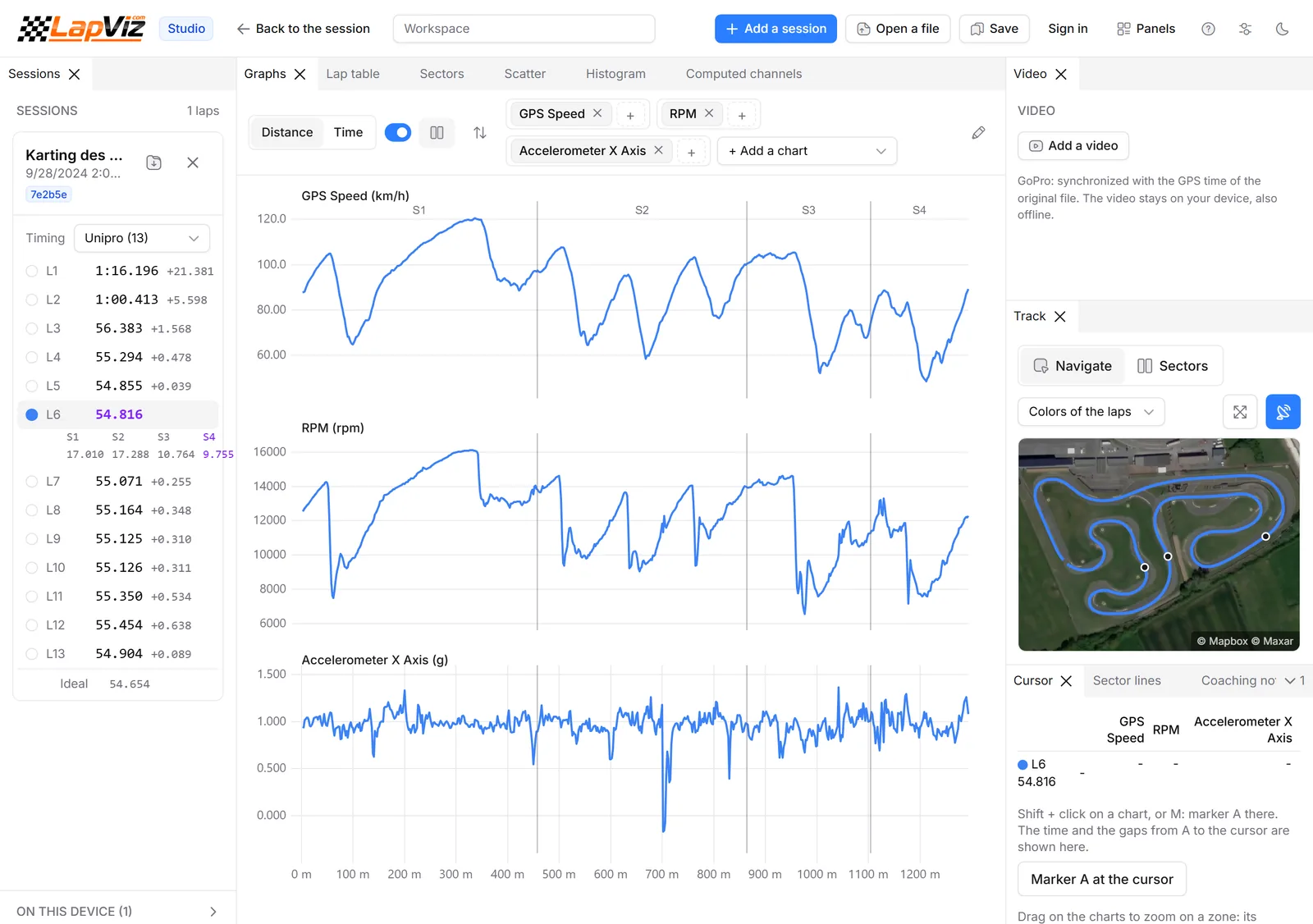
Every logger in one tool
No more one software per brand.
- AiM (.xrk, .xrz), Alfano, Unipro, RaceBox, VBO, LapTrophy, GoPro and more
- Files read in your browser, not uploaded, also offline
- Several loggers and drivers overlaid in the same chart
- Exports in CSV, KML, GPX and GeoJSON for your other tools
Every channel, the way you want it
The tools of the professional analysis software, without the license.
- RPM, speeds, temperatures, G-forces: every channel recorded by the logger
- Time or distance axis, as many charts and channels as needed
- Computed channels with a formula language: derivative, integral, smoothing, curvature, radius...
- Scatter, G-G diagram and histogram
- Templates of layouts and channels, like the math channels of Race Studio
The setup of every run
The setup is noted with the session, and compared.
- Tyres with their condition and laps, front and rear pressures, carburation, sprockets and chassis for each session
- The setup of your last session on the circuit copied, its laps added to the tyres, ready to adjust
- Setups compared on each circuit, the fastest one for each conditions highlighted
- The feeling of the driver from 1 to 5, and free notes for the track conditions and the changes
- Noted from the pit lane on the phone with LapViz Laptimer, synchronized with lapviz.com
Before and after a change
Did the change bring time? The data answers.
- Laps before and after the change overlaid, with the delta
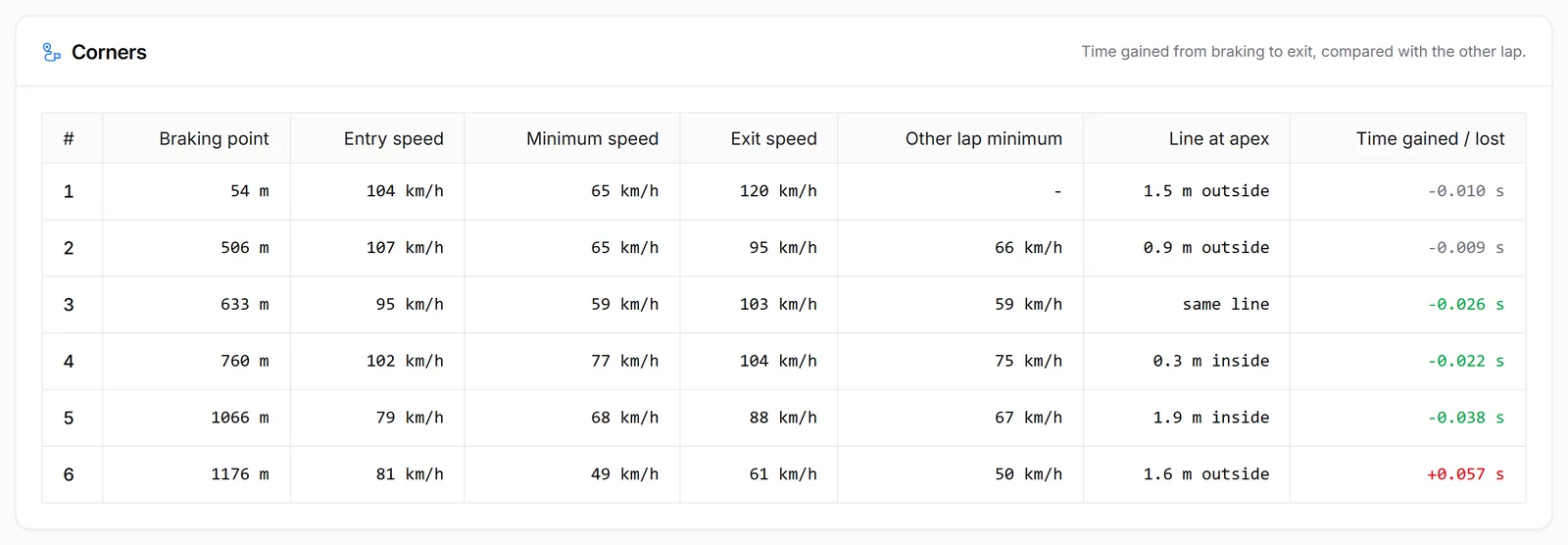
- Corners and mini-sectors where the time was gained or lost
- Two drivers on the same machine: tell the driver from the setup
- Cursor with zone statistics, measurements between two markers
Shared with the driver and the team
Everybody works on the same data.
- Workspaces saved in your account and shared as a read-only link
- The sessions of all the drivers of the team in one place
- Vehicles of the garage with their weight, power, torque and capacity
Try it now, without an accountFree
Drop a file of your logger or lap timer: nothing to install, no sign-up.
LapViz Studio
The analysis in your browser: the file is read on your computer and is not uploaded.
- Your laps overlaid, from several sessions and drivers, with the delta
- Every channel of the logger, by time or by distance
- Sectors, rolling best and ideal lap, track map on the satellite view
- On-board video synchronized with the data
3D replay
Your laps on the satellite view of the circuit, like in a racing game. The file is converted to be replayed, not kept.
- Every lap against the ghost of your best lap
- A second file as the ghost: race against a team-mate or a rival
- Chase, onboard and helicopter cameras, speed, revs and live gap
- The sound of the engine, following the revs of the session
Keep your sessions with a free account
Import your files into LapViz to find them everywhere and compare yourself with the others.
- Every session kept, on the web and in LapViz Laptimer
- Leaderboards per circuit and category
- Corner by corner analysis of every lap
- Sessions shared with your coach or your team
Frequently asked questions
Is it only for karts?
No. The analysis works for every vehicle: the channels are the ones of your logger, whatever it is mounted on. The setup form is made for karting (sprockets, carburation); the notes of the session keep the setup of any other vehicle.
Which channels can I analyse?
Every channel recorded in the file by your logger, and the channels you compute from them with the formulas of the Studio.
Do I still need the software of my logger?
Not for the analysis: LapViz reads the files directly. Keep the software of the brand to configure the logger, its sensors and its displays.
Are my files uploaded?
No. The files are read in your browser. They are only sent to LapViz if you choose to store them in your account.
Can I export the data?
Yes. The Studio exports in CSV, KML, GPX, GeoJSON and SRT subtitles; the analysis of a session exports in CSV, PDF and PNG.
Also in the LapViz suite
- LapViz Studio Analyse the files of your data logger or lap timer in the browser, also offline: lap overlay, delta, channels, track map, math channels and on-board video.
- Race Studio alternative Analyse your AiM .xrk files without Race Studio 3: lap overlay, delta, splits, math channels, G-G diagram and video, free in the browser, on a Mac too.
- AiM XRK viewer Open the .xrk and .xrz files of your AiM logger (MyChron, Solo, EVO...) in the browser, without Race Studio: laps, channels, GPS track, video and comparisons.
- For team managers All the sessions of your drivers in one place, live timing from the pit wall, private competitions and sharing you control. Free for kart, car and bike teams.
- For coaches Gather your drivers in a team, see their sessions whatever their laptimer, compare them corner by corner and share your debriefs. Free for coaches and drivers.
- Lap analysis See where you lose time in each corner: ideal lap from the mini-sectors, braking points, minimum speeds and your progress on each circuit.