

QStarz analysis
QStarz data analysis software, in your browser
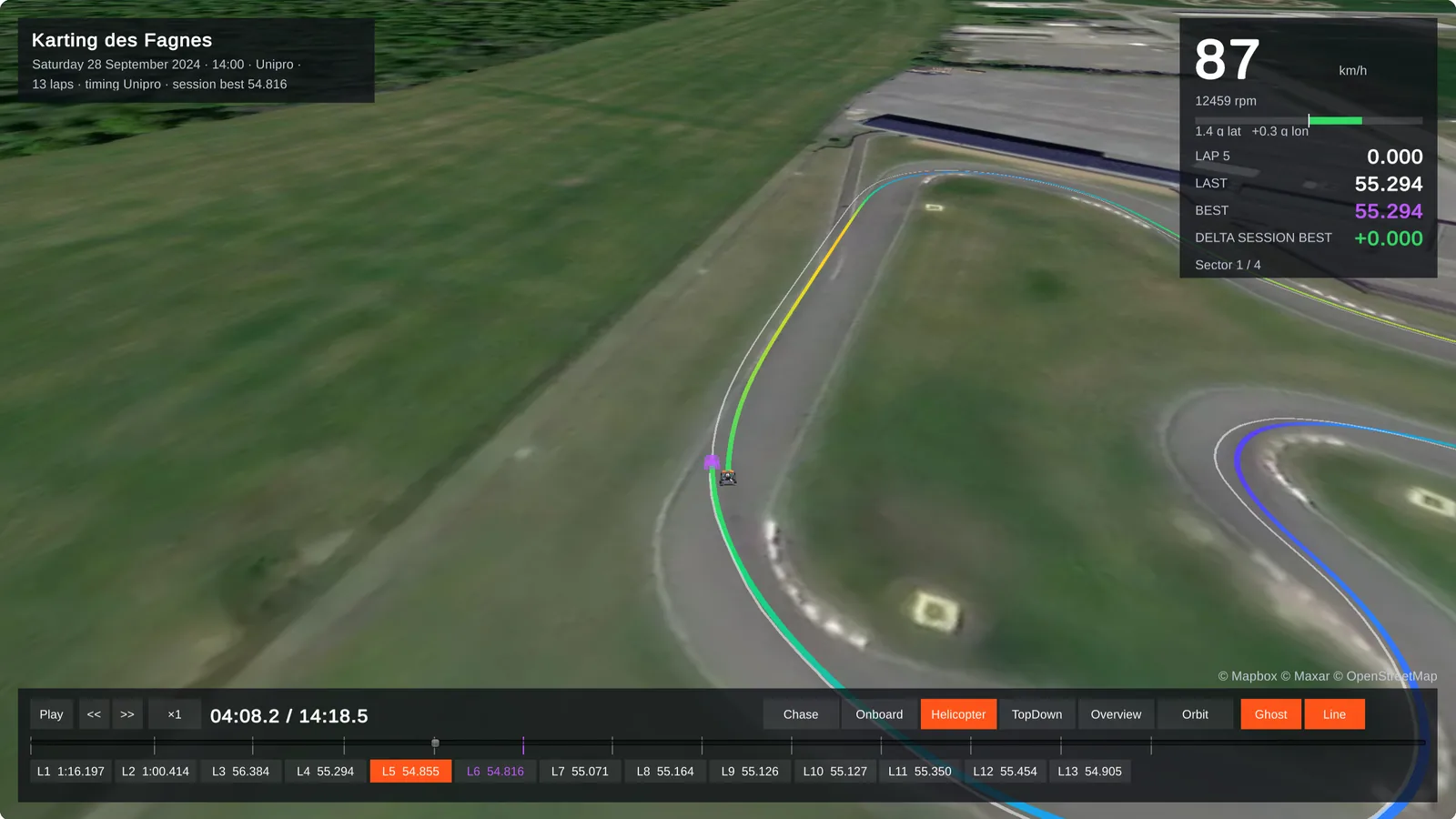
The QStarz LT-Q6000 lap timers keep their sessions in QRacing, on the PC. Send the .rcnx file of QRacing to LapViz Studio: the laps of QRacing are kept, the GPS and the accelerations can be drawn and compared on a PC, a Mac or a Chromebook, and the 3D replay brings the session back to life on the satellite view of the circuit.
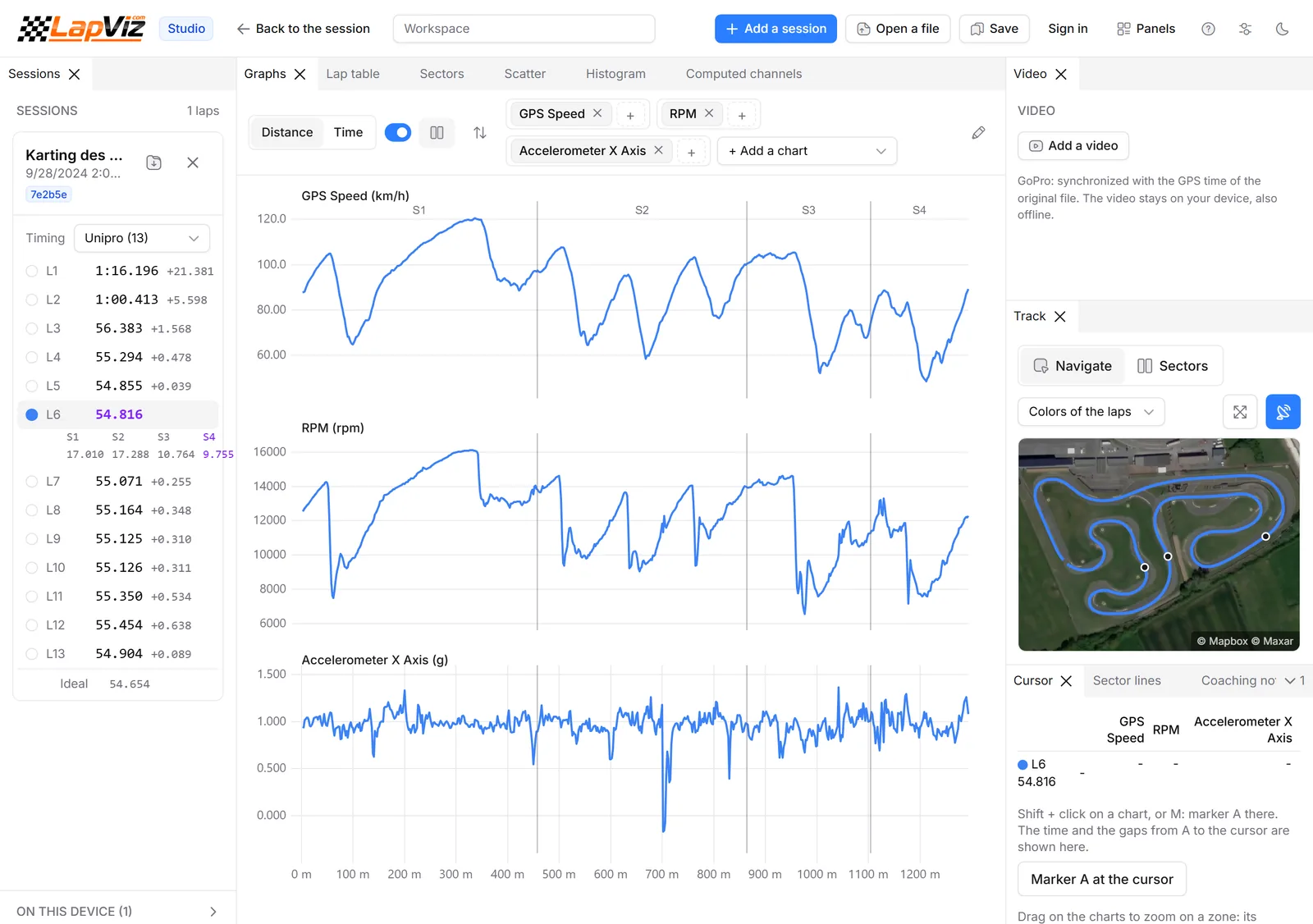
What LapViz reads in a QStarz file
The .rcnx file of QRacing, read by your browser.
- Laps of QRacing, kept as they are
- GPS position, speed, heading and altitude, at the rate of the logger
- Accelerations Gx, Gy and Gz
- A file with several sessions: the longest one is opened
Compare your laps
The analysis of a computer.
- Overlay of laps and sessions, with the delta
- Speed and G by distance, G-G diagram
- Sectors, rolling best and ideal lap
- On-board video synchronized with the data
Beyond QRacing
On a Mac, a Chromebook or a PC, and with the others.
- Runs in the browser, nothing to install
- Laps of several files in the same chart, whatever their logger
- 3D replay against the ghost of your best lap or of another driver
- Leaderboards per circuit and category
From the LT-Q6000 to LapViz
LapViz does not connect to the logger: download it in QRacing as usual, then open the file anywhere.
- Download the sessions of your LT-Q6000 in QRacing on your PC, as usual
- Export the session from QRacing as an .rcnx file
- Open LapViz Studio on any computer, a Mac included, and drop the file
- Drop it on the 3D replay page to watch your laps on the satellite view
- Create a free account to keep the session and appear on the leaderboard of the circuit
Try it now, without an accountFree
Drop a file of your logger or lap timer: nothing to install, no sign-up.
LapViz Studio
The analysis in your browser: the file is read on your computer and is not uploaded.
- Your laps overlaid, from several sessions and drivers, with the delta
- Every channel of the logger, by time or by distance
- Sectors, rolling best and ideal lap, track map on the satellite view
- On-board video synchronized with the data
3D replay
Your laps on the satellite view of the circuit, like in a racing game. The file is converted to be replayed, not kept.
- Every lap against the ghost of your best lap
- A second file as the ghost: race against a team-mate or a rival
- Chase, onboard and helicopter cameras, speed, revs and live gap
- The sound of the engine, following the revs of the session
Keep your sessions with a free account
Import your files into LapViz to find them everywhere and compare yourself with the others.
- Every session kept, on the web and in the LapViz app
- Leaderboards per circuit and category
- Corner by corner analysis of every lap
- Sessions shared with your coach or your team
Frequently asked questions
Which QStarz file do I send?
The .rcnx session file of QRacing, the PC software of the LT-Q6000. The CSV export of the QRacing app (BL-818GT receiver) is not read yet: send it anyway from the import page, it is kept and looked at.
Can I analyse my QStarz data on a Mac?
Yes. LapViz Studio opens the .rcnx files of QRacing in the browser of a Mac, a Chromebook or a PC, for free. QRacing is still needed to download the logger.
Are the laps of QRacing kept?
Yes. The laps of QRacing are kept as they are. On a circuit known by LapViz, the laps are also calculated from the GPS for the leaderboards.
Can I compare myself with a friend who uses another laptimer?
Yes. The Studio overlays the laps of files of different brands, and the leaderboards of the circuits gather every laptimer.
Is it free?
Yes. The Studio and the 3D replay are free and work without an account; the LapViz account is free too.
Also in the LapViz suite
- Lap timer data analysis Free data analysis software for the files of your lap timer: AiM MyChron, Alfano, Unipro, RaceBox, QStarz, VBOX, TrackAddict, RaceChrono and GoPro.
- RaceBox analysis Open the CSV exports of your RaceBox Mini or Micro: laps, GPS track, speed, G-forces and lap comparison, then compare yourself with the other drivers.
- Software comparison The best karting and track day data analysis software compared: LapViz, Race Studio 3, VBOX Test Suite, RaceChrono, Harry's LapTimer, TrackAddict, RaceBox.