

Lap timer data analysis
Lap timer data analysis software, for every brand
Whatever your lap timer, LapViz Studio analyses its files in the browser, for free: overlay your laps, find the time corner by corner, compare yourself with a team-mate who uses another brand, then replay the session in 3D. Karting, cars and motorbikes, on a PC, a Mac or a Chromebook.
The analysis tools
What you find in a professional data analysis software.
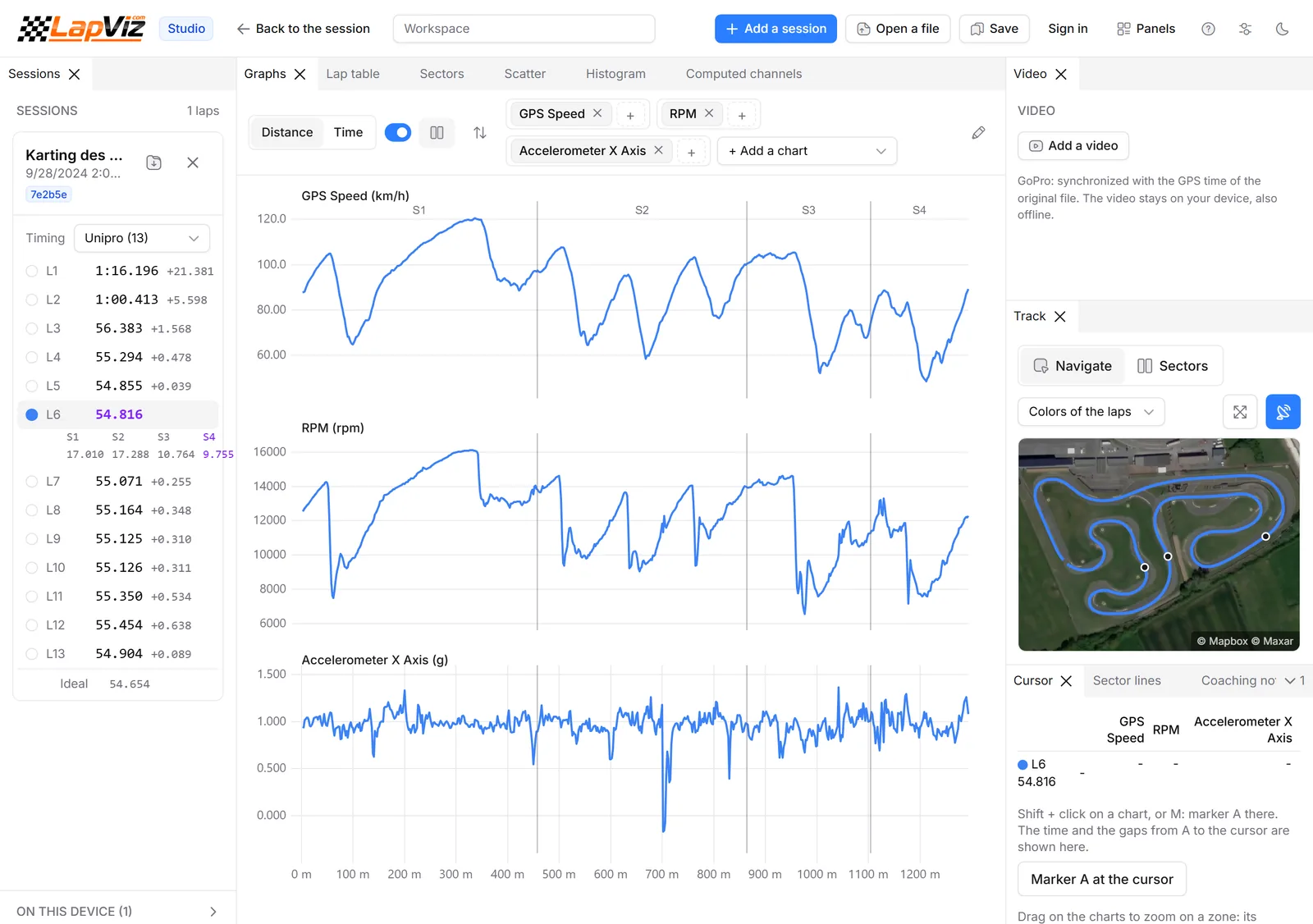
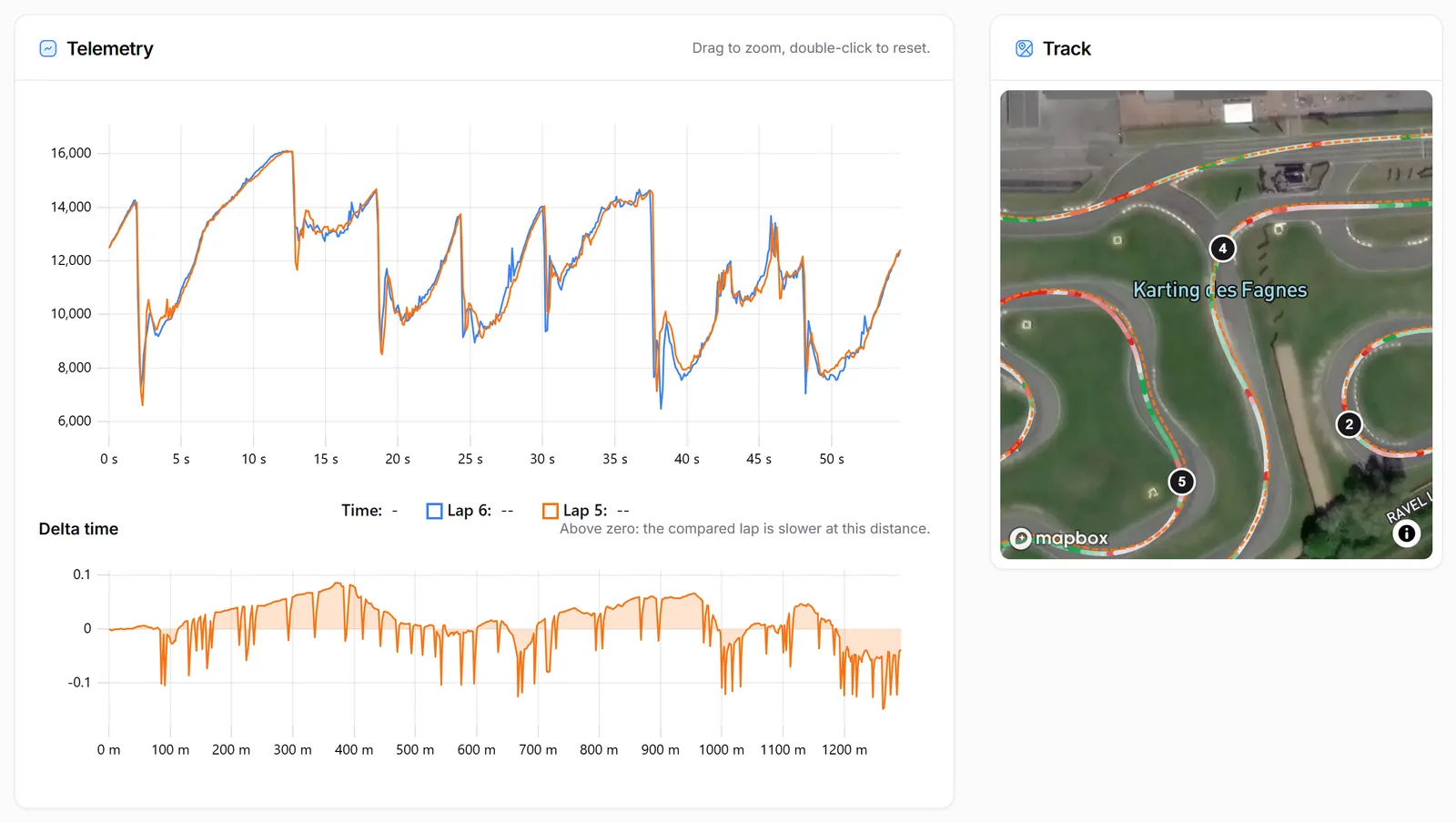
- Lap overlay with the delta, by time or by distance
- Every channel of the logger, and channels computed with formulas
- Sectors, rolling best and ideal lap
- Scatter, G-G diagram and histogram
- On-board video synchronized with the data
Every brand in the same tool
No conversion, no software of each brand to install.
- AiM, Unipro, Alfano, RaceBox, QStarz and TrackAddict files, with the laps of the device
- VBO and GPX exports of the apps and the loggers, laps calculated on the known circuits
- Laps of several brands in the same chart
After the analysis
Keep, share and compare.
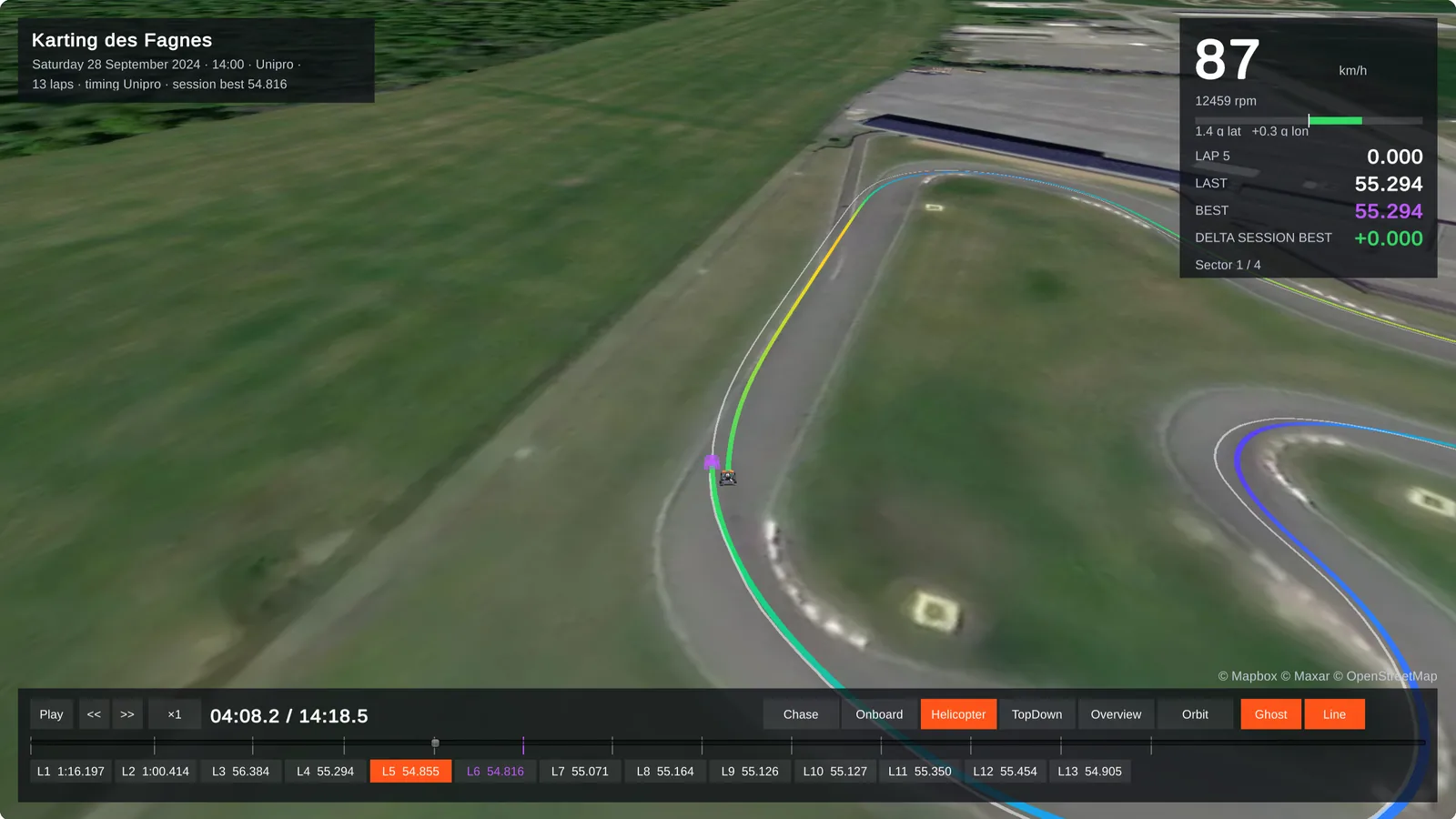
- 3D replay on the satellite view, with a ghost and the sound of the engine
- Leaderboards per circuit and category
- Sessions shared with your coach or your team
Analysis software per lap timer and app
- MyChron data analysis software, in your browser Free MyChron data analysis in the browser, on PC or Mac: open your .xrk files without Race Studio, compare laps, read every channel, replay them in 3D.
- AiM XRK viewer and data analysis, online Open the .xrk and .xrz files of your AiM logger (MyChron, Solo, EVO...) in the browser, without Race Studio: laps, channels, GPS track, video and comparisons.
- Unipro data analysis software, in your browser Open the .uni files of your Unipro UniGo laptimer in the browser: laps, sectors, every channel, track map, lap comparison and circuit leaderboards.
- Alfano data analysis software, in your browser Open the archives of your Alfano laptimer in the browser: laps, GPS track, speed, RPM, lap comparison, and the leaderboards of the circuits.
- RaceBox data analysis on your computer Open the CSV exports of your RaceBox Mini or Micro: laps, GPS track, speed, G-forces and lap comparison, then compare yourself with the other drivers.
- QStarz data analysis software, in your browser Analyse the sessions of your QStarz LT-Q6000 online: open the .rcnx file of QRacing free in the browser, compare laps, read the G and replay in 3D.
- TrackAddict data analysis on your computer Analyse your TrackAddict sessions on a PC or a Mac: open the Raw CSV of the app free in the browser, with its laps and OBD channels, and replay in 3D.
- VBOX data analysis, free in your browser Free VBOX data analysis in the browser: open the .vbo files of your Racelogic VBOX or of any app, compare laps, read every channel, replay them in 3D.
- RaceChrono data analysis on your computer Analyse your RaceChrono sessions on a PC or a Mac: open the .rcz file free in the browser, keep the laps of RaceChrono, compare them, replay in 3D.
- Harry's LapTimer data analysis on your computer Analyse your Harry's LapTimer sessions on a PC or a Mac: export them in VBO, open them free in the browser, compare laps and replay them in 3D.
- Lap times from your GoPro video Drop the video of your GoPro with GPS: LapViz finds the laps on the circuit, draws your speed and line, and syncs the video with the data of your logger.
Try it now, without an accountFree
Drop a file of your logger or lap timer: nothing to install, no sign-up.
LapViz Studio
The analysis in your browser: the file is read on your computer and is not uploaded.
- Your laps overlaid, from several sessions and drivers, with the delta
- Every channel of the logger, by time or by distance
- Sectors, rolling best and ideal lap, track map on the satellite view
- On-board video synchronized with the data
3D replay
Your laps on the satellite view of the circuit, like in a racing game. The file is converted to be replayed, not kept.
- Every lap against the ghost of your best lap
- A second file as the ghost: race against a team-mate or a rival
- Chase, onboard and helicopter cameras, speed, revs and live gap
- The sound of the engine, following the revs of the session
Keep your sessions with a free account
Import your files into LapViz to find them everywhere and compare yourself with the others.
- Every session kept, on the web and in the LapViz app
- Leaderboards per circuit and category
- Corner by corner analysis of every lap
- Sessions shared with your coach or your team
Frequently asked questions
What is the best software to analyse lap timer data?
The one that reads your files on your computer. LapViz Studio reads most lap timers and apps in the browser, for free; the software of your lap timer is still needed to configure and download it.
Is there free lap time analysis software?
Yes. LapViz Studio and the 3D replay are free and work without an account, in a recent browser.
Can I compare laps from two different lap timers?
Yes. The Studio overlays the laps of files of different brands, and the leaderboards of the circuits gather every laptimer.
Does it work on a Mac?
Yes. LapViz runs in the browser, on Windows, macOS, Linux and ChromeOS, with nothing to install.
Does it work for cars and motorbikes?
Yes. Teams, analysis and comparisons work the same for karts, cars and motorbikes.
My lap timer is not listed, what can I do?
Upload the file anyway from the import page: it is kept and LapViz looks at adding the format. Many apps can also export VBO or GPX, which LapViz reads.
Also in the LapViz suite
- LapViz Studio Analyse the files of your data logger or lap timer in the browser, also offline: lap overlay, delta, channels, track map, math channels and on-board video.
- Software comparison The best karting and track day data analysis software compared: LapViz, Race Studio 3, VBOX Test Suite, RaceChrono, Harry's LapTimer, TrackAddict, RaceBox.
- Lap analysis See where you lose time in each corner: ideal lap from the mini-sectors, braking points, minimum speeds and your progress on each circuit.